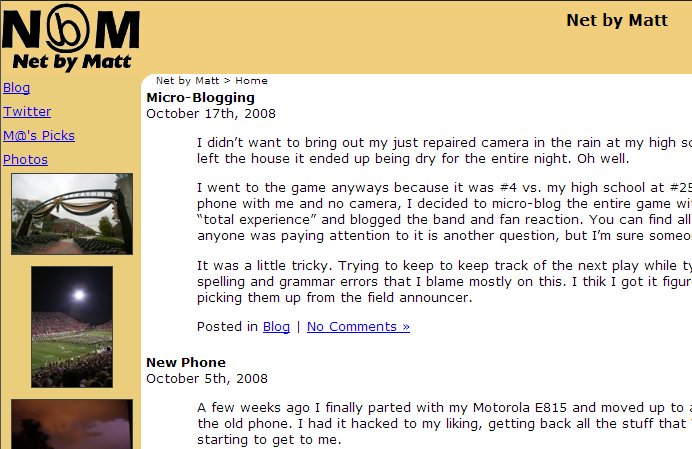
It’s done. Just over a weekend of work and I have re-designed both the blog and photos section of the site. Here’s what it used to look like.

That was from the summer of 2002, when I started at Purdue. Then, the site ran on Greymatter and didn’t have a photos section. Now, I’ve upgraded to WordPress and I’m using Gallery 2 to handle the photos.

About all that made it through the re-design was the backwards “b” logo (short for “by” and styled after the @ symbol) and the content. The tweets and random photos in the old design were added last-minute and didn’t fit the available space very well, which is what prompted me to start redesign the site.

I started with a WordPress theme called Grey Matter (purely coincidence) and customized it to my liking. I then adapted it for use with Gallery 2.

WordPress was a breeze to customize the theme, Gallery 2 was a little trickier. I feel like all of the documentation for it is not entirely up to date. For a challenge, I threw in some integration between Twitter, Gallery 2 and WordPress. You can see the results of that in the sidebar at the right with the random photos and recent tweets available on each page.

Something to note with the design, having the links and sidebar to the right makes the site much more accessible to small-screen devices, that tend to ignore layouts and just display content top to bottom. With the links at the left, the small-screen user has to scroll past all of them before they get to the page content. I’m noticing a lot of this as I find more and more uses for my new smartphone.

I didn’t want to bring out my just repaired camera in the rain at my high school’s football game since there was on and off rain. After I left the house it ended up being dry for the entire night. Oh well.

I went to the game anyways because it was #4 vs. my high school at #25. I expected a better game than what I saw. Since I had my phone with me and no camera, I decided to micro-blog the entire game with my commentary and score updates. I also went for the “total experience” and blogged the band and fan reaction. You can find all of that under the “Twitter” link at the left. Whether or not anyone was paying attention to it is another question, but I’m sure someone got some use out of it.

It was a little tricky. Trying to keep to keep track of the next play while typing up the last one on a tiny keyboard. You’ll notice some spelling and grammar errors that I blame mostly on this. I thik I got it figured out by then end I was even to get some player names in, picking them up from the field announcer.

A few weeks ago I finally parted with my Motorola E815 and moved up to a smartphone, a Motorola Q9c. I really didn’t want to get rid of the old phone. I had it hacked to my liking, getting back all the stuff that Verizon locks out, but battery and charging issues were starting to get to me.

Part of the reason I got the phone and data plan was because of the amount of traveling I do for work. Almost immediately I found out just how handy it is. Last week I was able to keep track of the baseball games from factory floors in Dallas and Milwaukee, and from the St. Louis airport. For this, I found Sportsline to work best.

I also use Google reader a lot to keep tabs on news, Digg and a handful of other RSS feeds that I follow. The integration between the full browser app and the mobile one is great. I can flip through my feeds at lunch, read the ones that I want to keep up on and star the remaining ones to look at later that day.

Google Maps has also been great. In addition to the directions it’s integrated to your contacts so you can get directions to any contact with an address in your phone book. Also, when looking up a business, the phone number is clickable and puts you right into a call. Finally, the traffic has also helped out, especially when I was in a Dallas and needed to know if I’d be able to make it to my flight.

For instant messenger, I found the free Slick to work best. It does it’s best to keep you connected, even after a call. The only gripe that I have is that I would like it to look at the phone’s profile (Loud, vibrate…) and adjust its alerts based on that.

I also picked up a Twitter client and I’m going to start using that. You can see my updates from that here. I’m currently looking into two different clients, and I don’t have a favorite yet.

I’ve made my web site mobile friendly. I didn’t do anything special for the blog, just added a Word Press plugin that puts a nice mobile theme in place when viewed from a mobile device. The photos section of the site, however, required a bit of work. I designed my own theme for Gallery2, and put together a few different ideas that I picked up from the support forum to get it to detect mobile devices and change the theme accordingly.

GIMP (GNU Image Manipulation Program) is an open source image editor that is comparable to Photoshop. By no means is it a drop in replacement. But a lot of the core functionality is there, including layers, filters, plugins, paths and channels. There is a bit of a learning curve, especially because the majority of tutorials on image editing are based on Photoshop. But with a lilttle legwork you can find the comparable features and create the same effects in GIMP without the price tag of Photoshop.